library(animovement)

movement <- read_dataset(get_sample_data("sleap")) |>
  set_metadata(sampling_rate = 30) |>
  convert_unit_time("s") |>
  convert_unit_space("cm", calibration_factor = 9 / 140)
#> Downloading sleap data...You rarely want to analyse completely raw tracking. There are points you don’t trust, gaps worth filling, and jitter to smooth out. aniprocess handles all three, and each has its own family of functions:
NAs, with mask_na_*().replace_na_*().filter_*().Do them in that order. Masking first turns bad points into gaps, so that the filling step bridges them instead of building on them, and smoothing last works on a complete, trustworthy track. After each step, run a check: the checks are cheap, and they show you what the step actually did to your data.
library(animovement)
movement <- read_dataset(get_sample_data("sleap")) |>
set_metadata(sampling_rate = 30) |>
convert_unit_time("s") |>
convert_unit_space("cm", calibration_factor = 9 / 140)#> Downloading sleap data...Each family has a function ending in _across() that works on a whole anipoint: it applies a method to every position column, within each track, using the frame’s metadata to find them. That’s what we use here.
Two criteria earn their place for this recording, and they catch different kinds of error.
Where the animal cannot have been. The maze runs from roughly x = 19 to 65 cm and y = 0 to 45 cm, as you can read off the first plot. Anything outside that box is not the mouse:
in_maze <- movement |>
  mask_na_across("roi", x_min = 19, x_max = 65, y_min = 0, y_max = 45)
A rectangle around a plus-shaped maze only rules out the impossible, not everything implausible, since the corners of the box are floor the mouse can’t reach either. But it costs nothing, and it removes every stray point.
Where the tracker wasn’t sure. The previous guide put the confidence threshold at 0.6:
masked <- in_maze |>
  mask_na_across("confidence", threshold = 0.6)
Rows with no confidence score at all are left alone, since a missing score means not assessed rather than poor. Set missing = "mask" to mask them too. In this recording those rows have no position anyway.
Check what the masks did. The confidence distribution now stops at 0.6, and the clump of guesses at zero is gone:
plot(check_confidence(masked))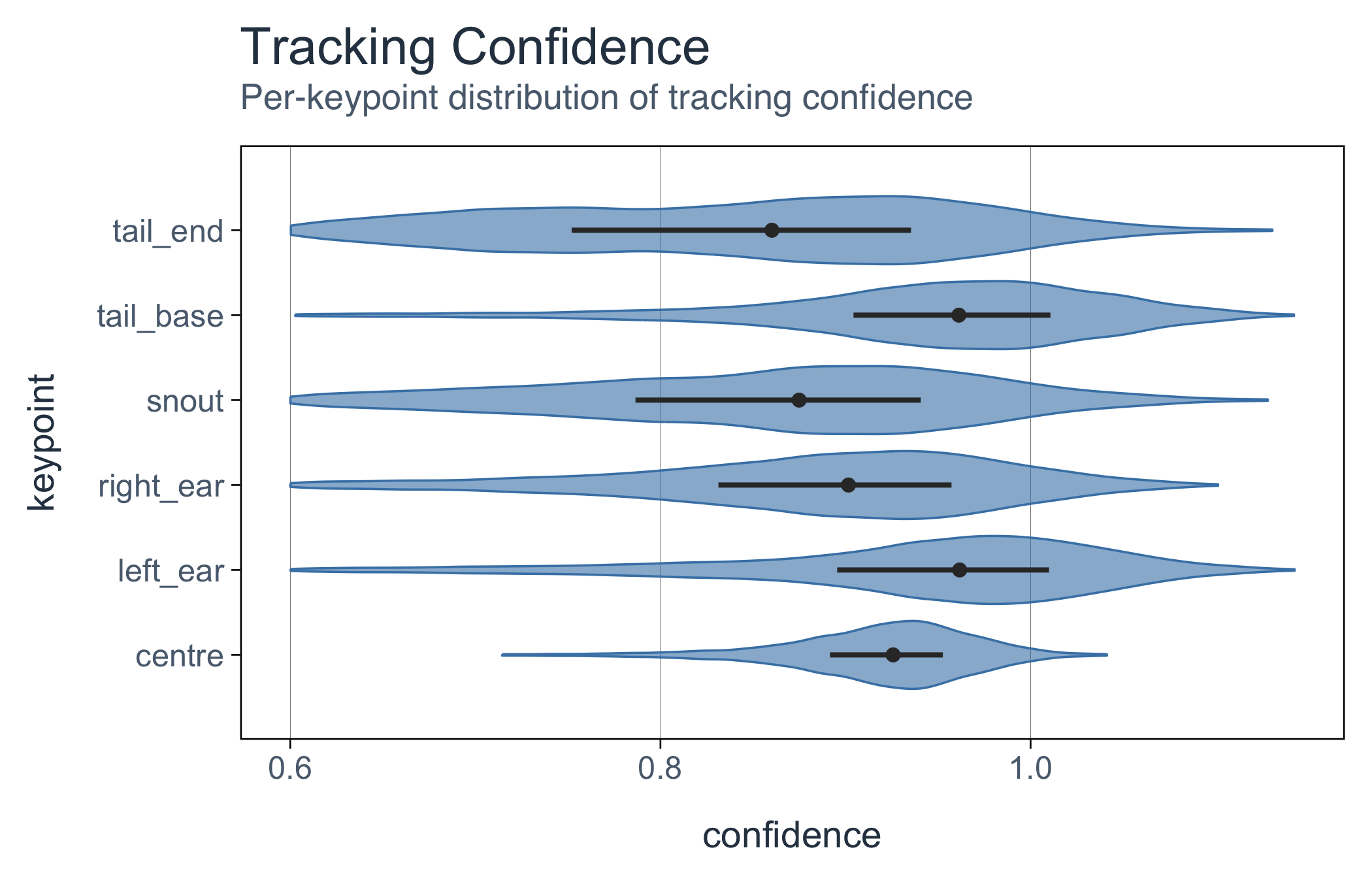
They also turned those guesses into gaps:
check_na_gapsize(masked)#>
#> -- Check: missing-value gap sizes
#> Tracking x: 16824 missing (15.2%) across 1692 gaps, longest 225 frames.
#> By group (individual and keypoint):
#> * individual1 | centre: 86 gaps, longest 113
#> * individual1 | left_ear: 191 gaps, longest 113
#> * individual1 | right_ear: 254 gaps, longest 115
#> * individual1 | snout: 474 gaps, longest 210
#> * individual1 | tail_base: 159 gaps, longest 114
#> * individual1 | tail_end: 528 gaps, longest 225Missing data has gone from 8.3% to 15.2%. Every keypoint has more gaps than before, and the snout, the tail end and the right ear, whose confidence was lowest, gained the most. What was guesswork is now visible as absence.
Using two criteria is normal, not overcautious. A confidence threshold alone would have kept the stray points, because the tracker was confident about them. A region alone would keep every low-confidence guess that happens to land on the maze. Being wrong in space and being wrong by the tracker’s own estimate are different failures, and each needs its own test.
mask_na_across() has more criteria to choose from:
| Method | Masks |
|---|---|
"range" |
values outside plausible bounds |
"roi" |
points outside a region of interest |
"confidence" |
points scored below a threshold |
"speed" |
jumps too fast to be real |
"excursion" |
a point that leaps away and later comes back |
"hampel" |
single-frame spikes, judged against the points around them |
Now interpolate, but only across gaps short enough to be honest about. max_gap is the safety valve: longer gaps are left missing rather than filled with an invented trajectory.
filled <- masked |>
  replace_na_across("linear", max_gap = 5)
Five frames is a sixth of a second here. Check the centre’s gaps again, before and after filling:
centre <- function(data) dplyr::filter(data, keypoint == "centre")

plot(check_na_gapsize(centre(masked)))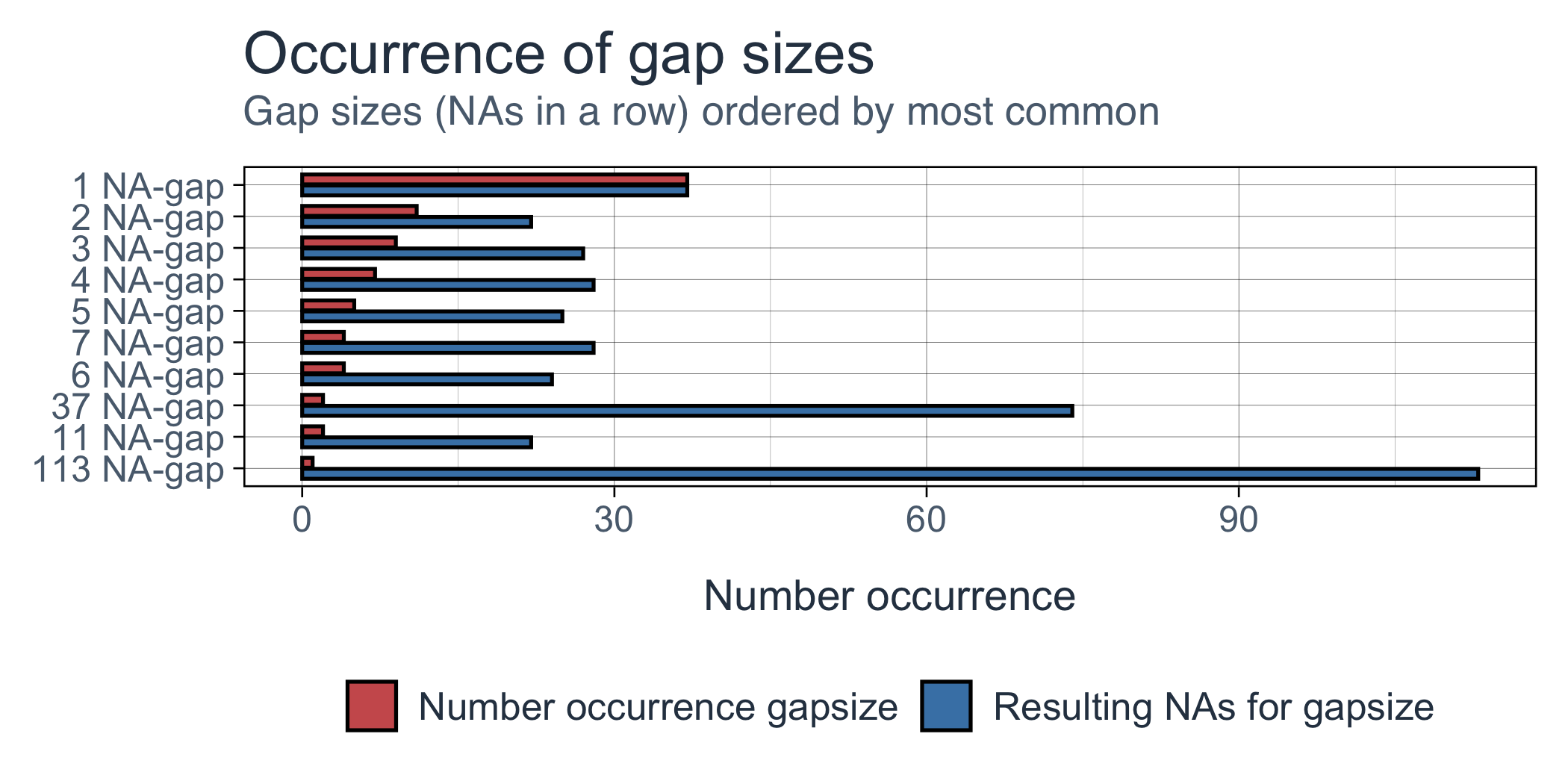
plot(check_na_gapsize(centre(filled)))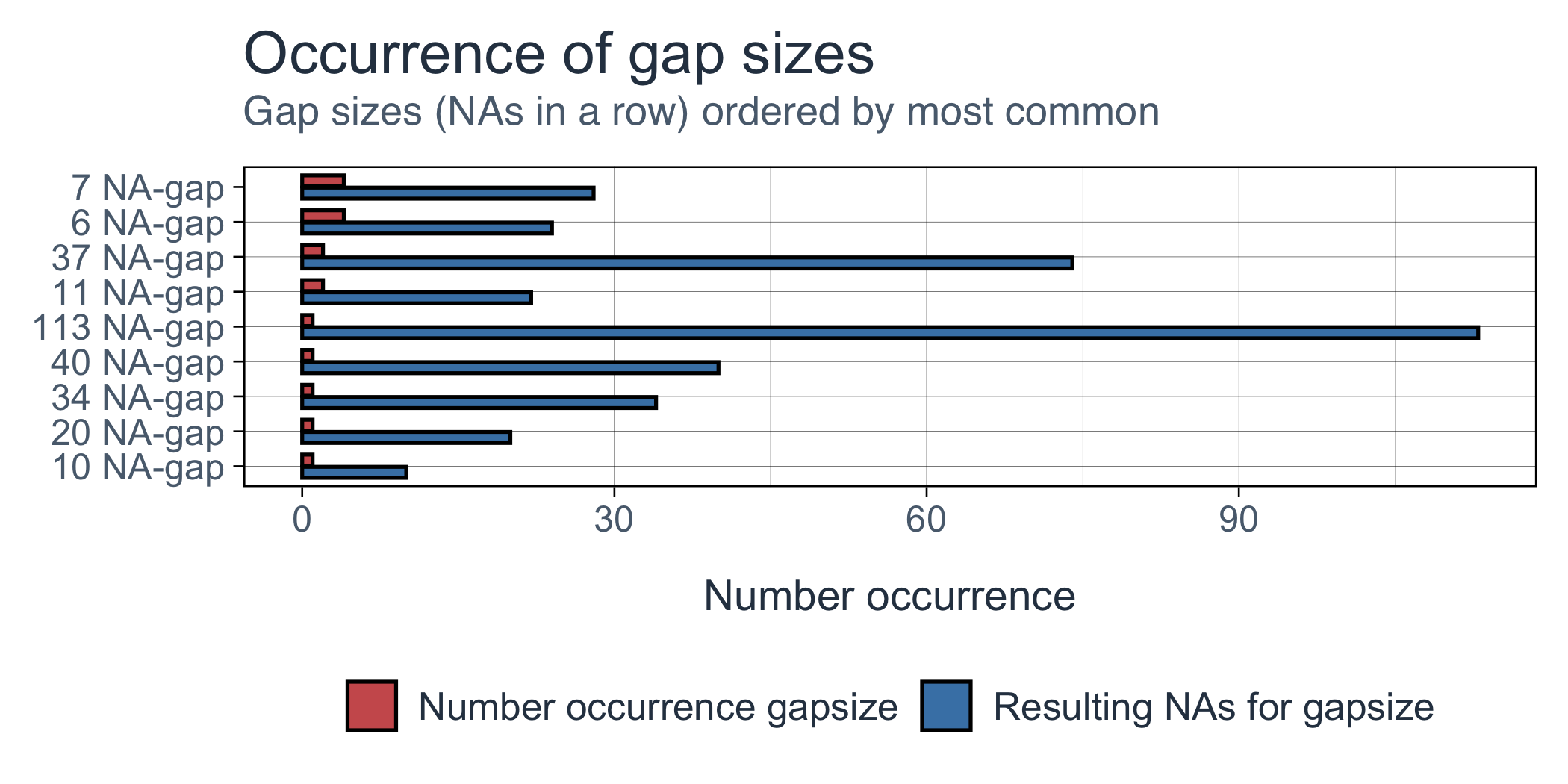
The short gaps are gone and the long ones are untouched. That’s why 13% of the data is still missing, as it should be.
Other methods swap in by name: "spline" for a smoother curve through the gap, "stine" for Stineman interpolation, "locf" to carry the last value forward, and "value" for a constant.
Even well-tracked keypoints wobble a little from frame to frame, and that wobble becomes noise as soon as you differentiate position into speed. The Savitzky–Golay filter fits a local polynomial, so it keeps the shape of real movement better than a plain moving average:
clean <- filled |>
  filter_across("sgolay", window_width = 11, order = 3)
A window of 11 frames at 30 fps is about a third of a second. Widen it and the track gets smoother, but real detail starts to disappear. Other methods include "rollmedian", which resists spikes, "gaussian" and "triangular" for gentle weighted smoothing, and "lowpass" and "kalman" for more control.
Smoothing doesn’t change what’s missing, so here the check to run is your eyes. Here are fifteen seconds of the centre, as the mouse runs along an arm, through the middle of the maze, up the opposite arm and back:
run <- function(data) dplyr::filter(centre(data), time > 335, time < 350)

plots(
  plot(run(movement)),
  plot(run(clean))
)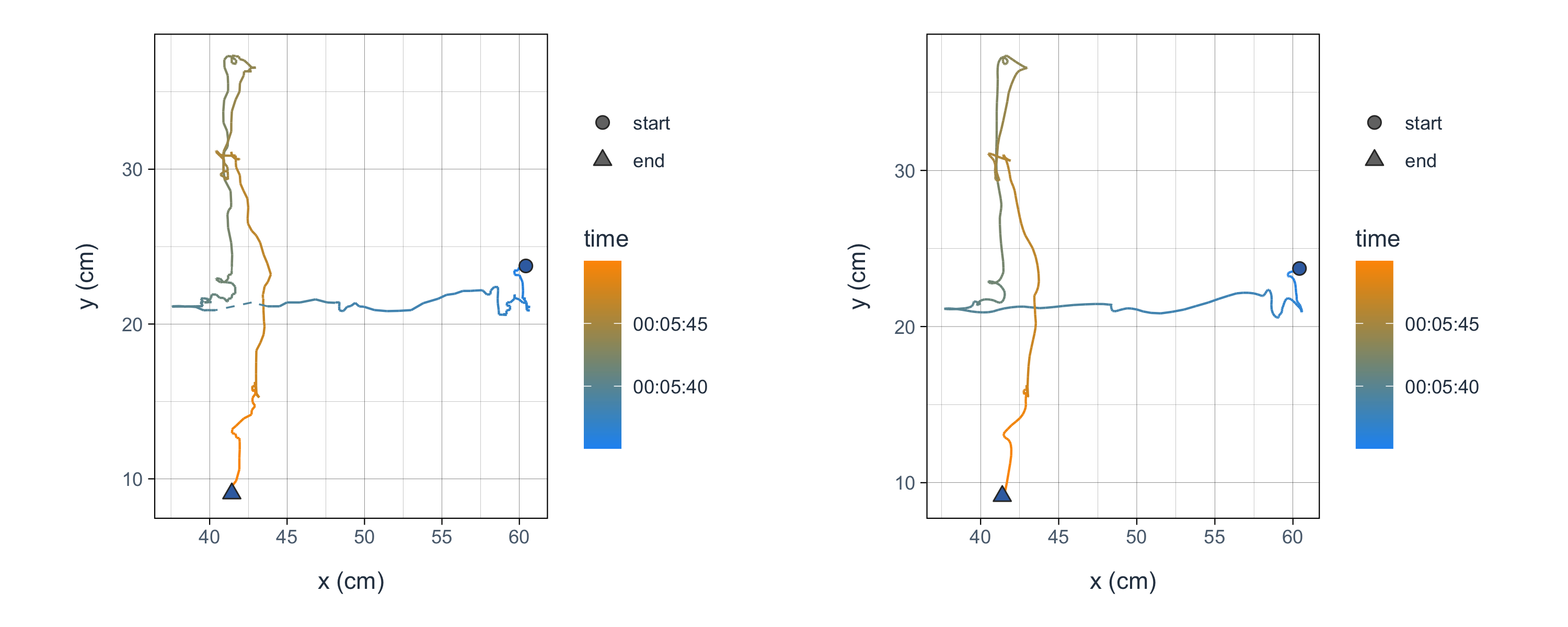
The processed track follows the same path, with the jitter gone and the short dropouts bridged.
Three steps in one pipe, and the result is still an anipoint:
clean <- read_dataset(get_sample_data("sleap")) |>
  set_metadata(sampling_rate = 30) |>
  convert_unit_time("s") |>
  convert_unit_space("cm", calibration_factor = 9 / 140) |>
  mask_na_across("roi", x_min = 19, x_max = 65, y_min = 0, y_max = 45) |>
  mask_na_across("confidence", threshold = 0.6) |>
  replace_na_across("linear", max_gap = 5) |>
filter_across("sgolay", window_width = 11, order = 3)filter_*() doesn’t drop rows
In animovement, filter_ means signal filtering: filter_across() smooths, and nothing in aniprocess drops a row. dplyr::filter() still works on an anipoint and still subsets rows, as it does on any data frame.
Next: calculate metrics.